


Display your company's User Board on a tablet in a common area or reception. One quick glance will show you the current statuses of your users. The auto lock screen setting prevents your tablet from going to sleep so your status board is always available. The status board auto refreshes to always display the latest information.
Simple In/Out is available for the most popular phone platforms. Employees who don't own a compatible device can use FrontDesk to update their status. The touch screen makes it easy: a quick swipe on their name and it's done. We support iOS and Android tablets.
Establish Company Favorites that can be used by anyone with two quick taps. Or, add a custom message to share essential information using an on-screen keyboard.
With announcements, you can easily keep your users informed about important updates, new events, and other casual information. Everything from company-wide meetings to office closures can be communicated to your users.
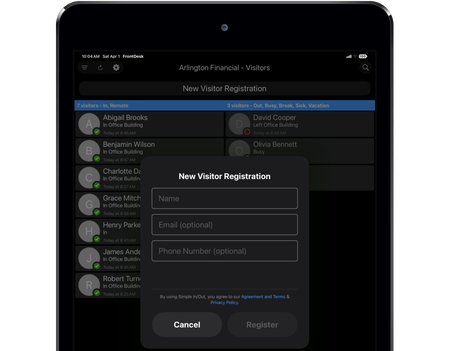
Give guests and contractors a board of their own, separate from your User Board. See who's checked in, find a visitor quickly, and keep their contact details close at hand. Display the Visitor Board on your reception tablet so your team can see who's visiting at a glance.
Let visitors sign themselves up on your tablet when they arrive. Collect the details your organization needs without asking guests to create a Simple In/Out account. Their information and current status are ready for your team on the Visitor Board.
When running on a tablet with Bluetooth 4.0 support (most iPads and some Android tablets), FrontDesk can act as a Beacon in addition to performing its main functions. This works just like a hardware Beacon. When a user equipped with the Simple In/Out app on their iOS or Android device comes within Bluetooth range of the tablet, they can be instantly checked in without having to touch the device. When they leave range, they will be checked out automatically.
The low-energy needs and precision of Bluetooth make Beacons a great solution for places where regular Geofences don’t work well (e.g. locations with poor cell reception, multiple locations in close proximity to each other). Beacons also work great for places where the location physically changes (like conference centers, automobiles, etc).