Desktop Presence automatic updates just by using your computer

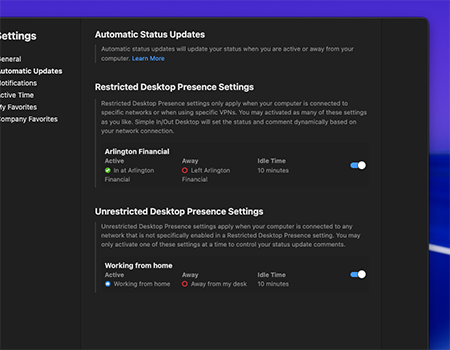
Our desktop apps for Windows and Mac can be configured to automatically update your status based on your computer activity. If you leave your computer unattended, Simple In/Out will check you out. Simple In/Out will then check you back in once you've returned to using your computer.
Keep the Board Up-To-Date

If your users live on their computers like we do, this is a great feature to keep the board up-to-date. When activity happens on their computer, Simple In/Out will make sure they are checked in. When their computer is idle, Simple In/Out will check them out. No more forgetting to update statuses.

The Ultimate Working from Home Tool

Our Desktop apps can even update your status and comment differently depending on whether you're in the office or working from home. This makes it easy to keep your co-workers informed of your whereabouts without having to remember to update your status. Learn more

Custom Updates Still Welcome

Automatic activity updates will only take effect if it changes the user's status. Users can use the Simple In/Out app to leave a custom status comment (e.g. "At Dentist") and the automatic out update that happens when their computer goes idle will leave the custom comment intact.

Desktop Presence ~ 8 minutes

Frequently Asked Questions

How does Simple In/Out know that I'm away?

When activated, Simple In/Out is notified from the operating system itself that the computer is no longer active. When we receive that message, we let Simple In/Out know that you are idle. After a certain amount of idle time, we update your status.

What happens if I shut down, close my laptop, or lose power completely?

If the app cannot tell the Simple In/Out cloud that you've left, we'll still detect you've gone idle after a certain period of time and update your status accordingly.

How does Simple In/Out Desktop know whether I'm at the office or working from home?

Simple In/Out Desktop Presence settings can be restricted by your administrators to specific IP address ranges. This is useful for organizations that want to ensure that Desktop Presence updates set specific statuses and comments only when the user is on a trusted network, such as your office network. By enabling a restricted Desktop Presence, Simple In/Out will evaluate your IP address to see if you're within the trusted network or not. If you are, Simple In/Out Desktop will set your status and comment accordingly. If you are not, it will fallback to the unrestricted Desktop Presence settings (if you have enabled one).


Try Simple In/Out free for 45 days.
No credit card required.

Start My Free Trial